A corporate training quiz with a leaderboard that measures
A corporate training quiz with a leaderboard does two jobs at once. The board keeps a room of sixty awake at 4 pm; the roster and the per-question report tell the trainer who passed, who did not, and which slide nobody understood.
Certification rounds that produce a score per person
Upload the employee list as a CSV or paste it. A trainee types their work email and their name, department and team fill in from the roster, so nobody types a name twice and nobody plays as "Guest". Make the session invite-only and walk-ins are refused. One attempt per email means the score is the score.
Set the number of questions each attempt draws from the pool, the per-question timer and whether the answer and explanation show after each question or stay hidden until the end. For a certification round, hide the reveal and set a longer timer. For a refresher, show the explanation so the quiz teaches as it tests. Picture questions ("which one is the new variant?") take four photos as options.
Fictional example: Bravanto Retail runs a ten-question round after every product launch. Anyone under eight out of ten is booked into the follow-up session automatically from the CSV.
A corporate training quiz with a leaderboard the room watches
The board on the wall reacts to every answer, not just at the end. Podium for the top three, then everyone, with players still in progress marked as playing. Individual ranking is score, then finished before playing, then fastest, then earliest, so a tie has a winner. Add a team field and team standings sit above the podium, ranked by best average score and then total points, so Sales North with 40 people does not beat Marketing with 12 on headcount.
Choose full names, first names or initials on the board. In a hall of 300 that keeps the screen readable and the bottom of the table private.
Per-question weak spots
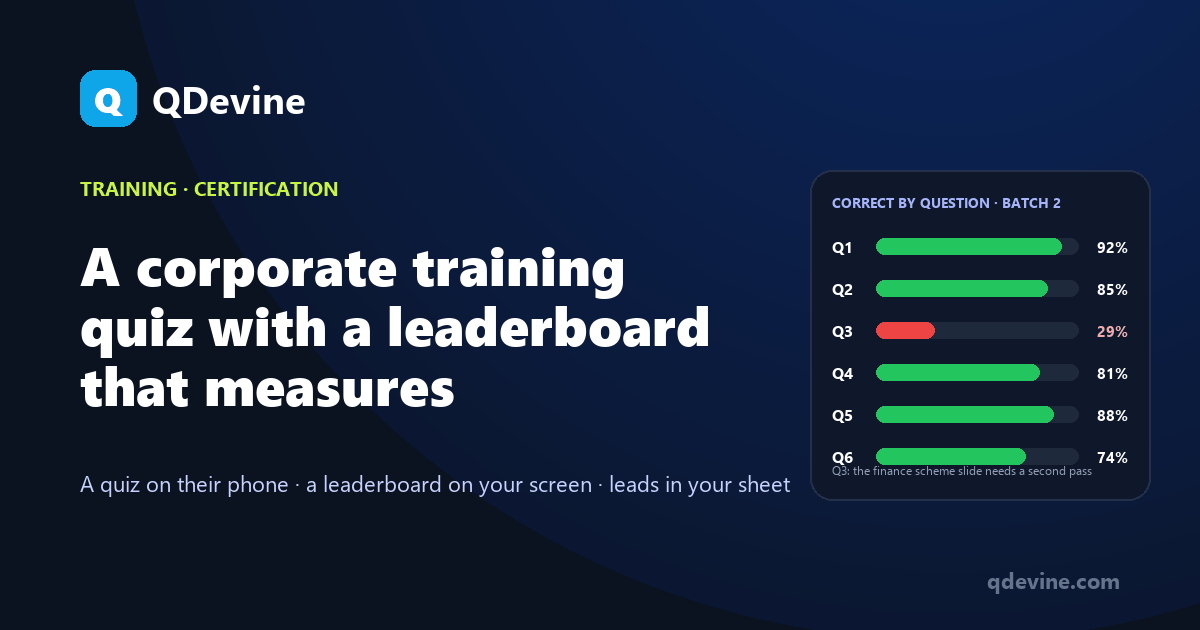
After the round, the dashboard shows correct answers by question. If Q3 on the new finance scheme sits at 29 percent while everything else is above 80, that is tomorrow's first slide. Compare batches question by question by cloning the same quiz for each cohort. In Stage mode the split appears on the screen while the question is open, so the trainer sees the confusion before the reveal and can address it in the room.
Two ways to run it: self-paced or from the trainer's phone
- Self-paced. Trainees scan and complete the round at their own pace, in the room or from the field. Good for certification, onboarding weeks and refreshers across regions.
- Stage mode. The trainer's phone drives the room: Start, question, Reveal, Standings, Next. Everyone answers the same question at once, the wall shows the live split, and a late arrival joins from the next question. Good for the closing round of a workshop or a dealer training.
Either way the player screens exist in English and Hindi, and the AI builder writes questions in both from your training deck or PDF. Edit them in the form before the session.
Exports for HR and the training manager
The CSV carries rank, name, email, department, team, your custom fields, score, total, time, status and per-question answers, with times in your time zone. Connect a Google Sheet and each trainee lands in it as they register, with the score written in when they finish; or post a signed webhook to your LMS or HR system. If you would rather store nothing personal, a "Just a name" round keeps only a display name.
A round for up to 30 people runs on the Free plan with every feature. One Event Pass at ₹9,999 plus GST covers a session for 30 days with unlimited people and the exports; a company running a session a month pays ₹5,999 per pass from ten, valid for 12 months, or takes the Agency year at ₹99,999 for unlimited sessions, paid once with no auto-debit.
Questions L&D teams ask
Can we set a pass mark and see who failed?
The CSV has the score and total per person; sort or filter it in Excel or your sheet for anyone under the mark. Per-question answers are in the same file for a retake plan.
Can trainees retake the quiz?
One attempt per email keeps the certification honest. A trainer can reset an individual attempt from Live Ops, or clone the event as a retake round with its own roster.
Does it work for field staff on their own phones?
Yes. Share the link or QR on WhatsApp; the round runs in the phone browser on mobile data with no app. Set a window by keeping the event live for as long as you like within the pass's 30 days.
Can we hide the answers until the end?
Yes. Set the answer-reveal time to zero and the explanation is not shown after each question; trainees see their score at the end and the trainer sees per-question results in the dashboard.
Read next
- Training and town halls: the solution page, with what you walk out with.
- Town hall quiz app: the same product with nothing personal stored.
- Dealer meet quiz ideas: region-versus-region rounds for a channel audience.